




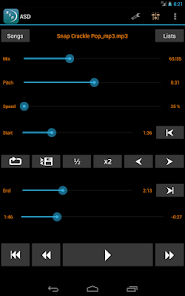
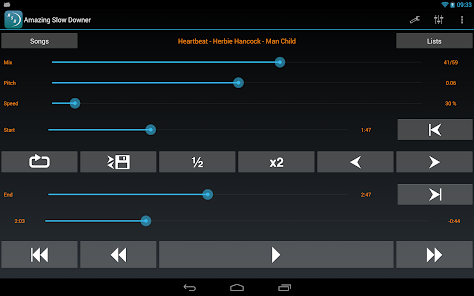
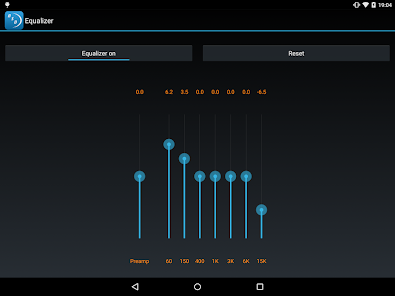
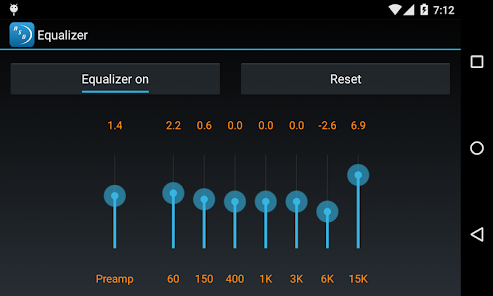
Amazing Slow Downer is an app designed to help musicians learn and practice songs by slowing down the tempo without changing the pitch. It can also be used to change the pitch of a song without changing the tempo. The app is available for both iOS and Android devices.
The Amazing Slow Downer App is one of the most popular and useful slowing down apps available today. It allows you to change the tempo and pitch of any song or audio file, making it perfect for practicing your instruments or learning new songs. It also has a number of other features that make it an indispensable tool for musicians of all levels. If you're a musician, you know how important it is to be able to practice your craft. But sometimes, life gets in the way and you can't always make it to your instrument. That's where Amazing Slow Downer App comes in! This app allows you to slow down or speed up recorded music, so you can hear every detail and work on your own playing. It's great for learning new songs, practicing tricky parts, or just jamming along with your favorite tunes. There are many benefits to using the Amazing Slow Downer app. Perhaps the most obvious benefit is that it allows you to slow down music without affecting the pitch. This can be extremely helpful when trying to learn a new song or piece of music. It also allows you to change the pitch of the music, which can be useful for practicing in a different key or for making transposing easier.Features and Functions
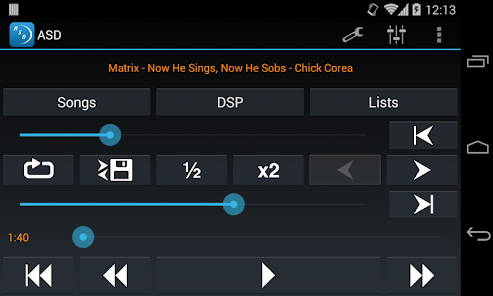
One of the most useful features of the Amazing Slow Downer App is the ability to loop sections of a song. This is perfect for practicing difficult passages or working on your timing. You can also create custom loops and save them for later use.
Another great feature is the built-in metronome. This is perfect for keeping time while you practice, or for working on your sense of rhythm. The metronome can be set to any tempo, making it very versatile.
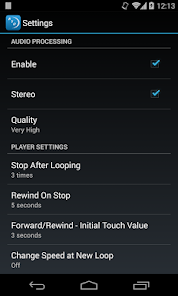
The Amazing Slow Downer App also has a number of different settings that allow you to customize how it works. For example, you can choose whether or not to change the pitch when you slow down a song. You can also set the app to automatically transpose songs into a different key, which can be very useful if you're playing along with another musician who is in a different key than you are.
There are also a number of different ways to view the waveform of a song in the app. This can be helpful for seeing where certain notes are located within a song, or for finding areas where you may need to work onHow to Use Amazing Slow Downer
Here's how to use Amazing Slow Downer App:
1. Download the app from the App Store or Google Play.
2. Open the app and choose the song you want to slow down or speed up.
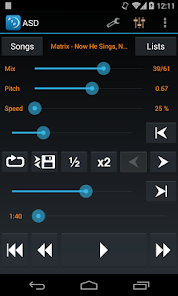
3. Use the slider at the bottom of the screen to adjust the playback speed.
4. You can also change the pitch of the song by tapping on "Pitch" and using the slider that appears.
5. Once you're finished, tap "Done" and then "Save."Pros & Cons
Another benefit of the Amazing Slow Downer app is that it has a loop function, which allows you to repeat a section of the song over and over again. This can be very helpful when you are trying to learn a particularly difficult section of music. You can also change the speed at which the loop repeats, which can help you gradually build up your speed and stamina.
One potential downside of using the Amazing Slow Downer app is that it can be difficult to get used to hearing slowed-down music. If you are using it for long periods of time, it can take some getting used to before it starts to sound natural again. Additionally, because the app slows down music without affecting its pitch, some people may find that it makes songs sound strange or eerie.

 Enhances learning by allowing you to slow down music and audio. Facilitates practice by adjusting pitch without altering tempo. Supports musicians with loop features for repetitive playing. User-friendly interface makes navigation simple and intuitive. Compatible with multiple audio formats for versatile use.
 Limited format support may restrict user choices for audio files. Steeper learning curve can deter less tech-savvy users. Higher price compared to similar software options may not justify features.
 Amazing Slow Downer is designed to respect user privacy and does not collect personal data unless explicitly provided for specific features or support requests.
Yes, Amazing Slow Downer offers a free trial that allows users to test the app's features before committing to a purchase, although some limitations may apply compared to the full version.
No, Amazing Slow Downer does not require an internet connection to function, as it allows users to work with audio files stored locally on their devices.
You can contact support or send feedback for Amazing Slow Downer through the app's official website or within the app itself, where contact details and support options are provided.
Users can manage or cancel their subscription directly through the app store where they purchased it, following the specific instructions for their platform regarding subscriptions.
Unfortunately, customer numbers cannot be changed. If you have concerns, please reach out to our customer service for further assistance.
You can reach our customer service team via email at support
To update your customer information, log in to your account and navigate to the profile settings. If you encounter any issues, reach out to customer service.
To activate your account, follow the link in the confirmation email sent after your purchase. If you didn't receive it, check your spam folder or contact customer service.
Visit the login page on our website and enter your registered email and password to access your account.











 Google Play
  App Store







