
Microsoft Word Mobile App is a powerful word processing app that lets you write, edit and format documents on the go. With its convenient touchscreen interface, it's easy to get your work done on the go. Additionally, the app has plenty of features that are ideal for business owners and professionals. If you're looking for an app that can help you with your writing tasks, then Microsoft Word Mobile App is a great option to consider.
Features of Microsoft Word App
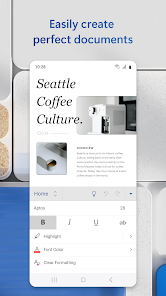
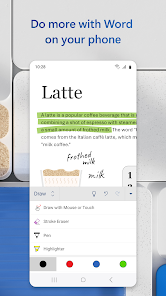
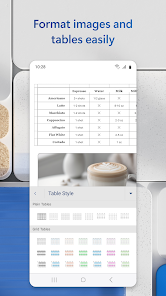
The Microsoft Word app is a powerful word processing tool that offers a rich suite of features designed for both casual and professional users. One of its standout features is its robust editing and formatting capabilities, allowing users to customize text with various fonts, styles, and sizes. The app also supports the insertion of images, tables, and charts, making it easier to create visually appealing documents.
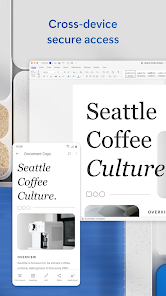
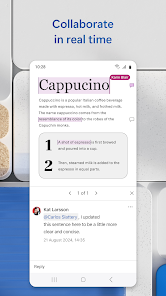
Collaboration is another key feature, as the app enables real-time editing and sharing among multiple users. This is particularly useful for teams working on projects together, as changes can be tracked and managed efficiently. Additionally, the app includes cloud integration through OneDrive, allowing users to save and access documents from any device.
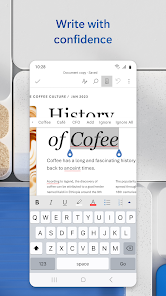
Other notable features include spell check, grammar suggestions, and a built-in thesaurus, which enhance the writing experience. The app also supports a variety of file formats, facilitating easy sharing and compatibility with other word processors. Overall, the Microsoft Word app combines versatility and functionality, making it a go-to choice for anyone needing to create, edit, or collaborate on text documents.
How to Use Microsoft Word App
Using the Microsoft Word app is straightforward and user-friendly. To get started, download the app from your device’s app store, whether it’s iOS or Android, and install it. Once installed, you can sign in with your Microsoft account or create a new one if you don’t have an existing account. After logging in, you are greeted with a home screen that provides options to create a new document or access existing files stored in the cloud.
To create a new document, simply tap on the “New” button, where you can choose from a variety of templates or start from a blank page. The editing interface is intuitive, featuring a toolbar with formatting options at the top. You can easily add text, images, and tables, and use the “Review” tab to check spelling and grammar. For collaborative work, share the document by selecting the “Share” option and inviting others via email or link.
Once your document is ready, you can save it directly to OneDrive or export it in various formats, including PDF. The app also allows for offline editing, ensuring that you can work without an internet connection. Overall, the Microsoft Word app is designed to enhance productivity, making it easy to create and manage documents on the go.
Pros & Cons of Microsoft Word App
Like any application, the Microsoft Word app has its advantages and disadvantages. One of the primary benefits is its comprehensive feature set, which includes advanced editing tools, templates, and formatting options. The app is particularly favored for its collaborative capabilities, allowing multiple users to edit documents in real-time, which is a significant advantage for teams. Additionally, seamless integration with OneDrive enables easy access and storage of documents across devices.
However, there are some drawbacks to consider. The app requires a Microsoft account for full functionality, which may be a barrier for some users. While basic features are available for free, many advanced functionalities are locked behind a subscription, which can be a downside for users looking for a cost-effective solution. Additionally, some users may find the interface overwhelming due to its extensive options and features.
In summary, the Microsoft Word app is a powerful tool for word processing with numerous features that cater to both individual and collaborative needs. While it does come with some limitations, especially regarding cost and complexity, its strengths make it a favored choice for many users around the world.

 Intuitive interface for easy navigation and editing. Comprehensive formatting tools for professional-looking documents. Real-time collaboration enhances teamwork and productivity. Extensive templates simplify document creation and customization. Cloud integration ensures access from any device anytime.
 Limited collaboration features for multiple users Formatting issues can arise when sharing documents High system resource usage can slow performance Subscription model can be costly over time
 Yes, Microsoft Word: Edit Documents may collect personal data as outlined in Microsoft's privacy policy. This data is typically used to enhance user experience, provide support, and improve the app's functionality. Users can manage their privacy settings through their Microsoft account.
Microsoft Word: Edit Documents offers a free version with limited features, allowing users to create and edit documents. Additionally, a free trial of the full version may be available for new users, providing temporary access to all premium features.
While Microsoft Word: Edit Documents can be used offline, certain features, such as real-time collaboration and cloud storage access, require an internet connection. Most basic editing functions are available without being online.
To contact support or send feedback for Microsoft Word: Edit Documents, users can visit the Microsoft Support website or use the feedback option within the app. Support is available through various channels, including chat, email, and community forums.
You can manage or cancel your Microsoft Word: Edit Documents subscription by logging into your Microsoft account on the official website. From there, navigate to the subscriptions section to view your current plan and make any necessary changes.
You can reach customer service by visiting the official Microsoft support website or calling their support hotline listed on the site.
Open the app, go to "File," select "Account," and enter your product key under the activation section.
Your customer number can typically be found in your purchase confirmation email or by logging into your Microsoft account.
Open the app and click on the "Sign In" option, then enter your Microsoft account credentials.
Yes, activation is required to access all features; you can activate it using the product key received upon purchase.





 Google Play
  App Store