



This site uses cookies to enhance your user experience. By clicking any link on this site you are giving your consent to our cookie policy. Read more
Reject
Accept All
StarMaker: Sing Karaoke Songs

StarMaker: Sing Karaoke Songs

4.4
Advertisement(PageType: detail | Position: pre3 )

Information

  • Category: Music & Audio
  • Price: free
  • Age Rating: Teen
  • Rating:
    4.4
  • Developer: SKYWORK AI PTE. LTD.
  • Version: 9.3.5
Advertisement(PageType: detail | Position: pre4 )
Screenshot 1
Screenshot 2
Screenshot 3
Screenshot 4
Screenshot 5
Screenshot 6
Screenshot 7
Screenshot 8
Screenshot 9
Screenshot 10
Screenshot 11
Screenshot 12
Screenshot 13
Screenshot 14
Screenshot 15

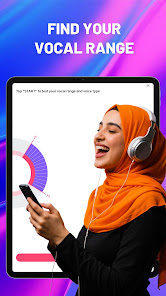
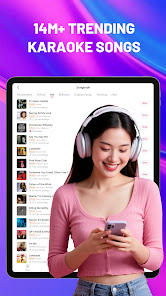
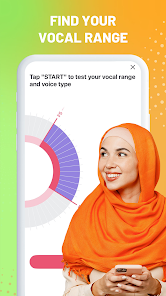
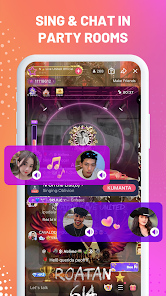
StarMaker: Sing Karaoke Songs is a mobile app that allows users to sing and record their own music. The app includes a wide range of popular songs, as well as tools and features that make it easy for users to record and share their own performances. Some of the key features of StarMaker: Sing and Play include the ability to sing along to songs with on-screen lyrics, record and share videos of your performances, and customize your recordings with special effects and filters. The app is available on both iOS and Android devices.

Features of StarMaker: Sing Karaoke Songs App

The StarMaker app offers a range of features to enhance your karaoke singing experience:

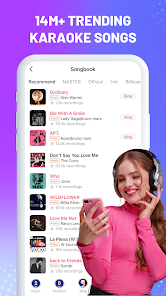
  • Karaoke Library: Access a vast library of popular songs from various genres and languages to sing along to.
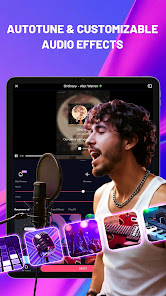
  • Recording Studio: Record your performances with high-quality audio and customize the sound effects to enhance your singing.
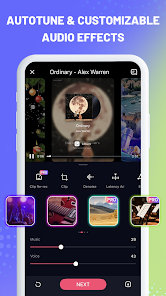
  • Real-Time Audio Effects: Apply real-time audio effects to your voice, such as reverb, echo, and pitch correction, to improve your vocal performance.
  • Duet and Collab: Collaborate with other users by creating duets or joining existing collaborations to sing with friends or fellow karaoke enthusiasts.
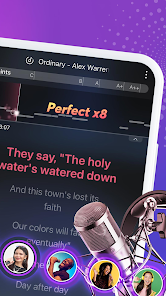
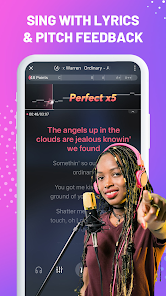
  • Sing and Record with Lyrics: Sing along to on-screen lyrics synchronized with the music to help you stay in tune and follow the song.
  • Video Effects and Filters: Add video effects and filters to your recordings to create visually appealing and professional-looking karaoke videos.
  • Share and Connect: Share your performances on social media platforms and connect with other singers, receive feedback, and participate in singing challenges and competitions.
  • In-App Challenges and Rewards: Engage in various singing challenges and earn rewards, badges, and virtual currency to unlock additional songs or features.


How to Use StarMaker: Sing Karaoke Songs App

Using the StarMaker app to sing karaoke songs is simple and enjoyable:

  1. Download and Install: Search for the StarMaker app in your device's app store and install it on your smartphone or tablet.
  2. Create an Account: Sign up for an account using your email address or social media accounts like Facebook or Google.
  3. Explore the Song Library: Browse the vast song library and choose a song you want to sing.
  4. Select and Customize the Song: Customize the song by selecting the desired key, adjusting the tempo, and applying audio effects if desired.
  5. Follow the Lyrics: As the song plays, sing along while following the on-screen lyrics synchronized with the music.
  6. Record Your Performance: Start recording your performance, showcasing your singing skills and adding your unique touch to the song.
  7. Enhance Your Recording: Apply audio effects and filters to your recorded performance to enhance the sound quality and add visual effects.
  8. Preview and Share: Preview your recording, make any necessary adjustments, and then share your karaoke masterpiece with friends and followers on social media platforms.


Pros & Cons of StarMaker: Sing Karaoke Songs App

Pros:

  • Large Song Library: The app offers a vast collection of songs from various genres and languages.
  • High-Quality Audio Recording: Record your performances with high-quality audio to capture the true essence of your singing.
  • Real-Time Audio Effects: The availability of real-time audio effects helps enhance your vocal performance.
  • Video Effects and Filters: Add video effects and filters to your recordings to make them visually appealing and engaging.

Cons:

  • Subscription Required for Full Access: Some features and songs may require a subscription to unlock.
  • Limited Song Selection for Free Users: Free users may have limited access to the app's song library.
  • Occasional Technical Issues: Users have reported occasional technical issues like lagging or crashes.

Pros
  • Enjoy a vast library of songs across various genres for endless fun.
  • Connect with friends and other users for a social singing experience.
  • Record your performances and share them easily on social media.
  • Access real-time pitch correction to improve your singing skills.
  • Participate in exciting challenges and contests to showcase your talent.
Cons
  • Limited song selection may not satisfy all musical tastes
  • In-app purchases can lead to unexpected costs
  • Audio quality may vary, impacting the overall singing experience
Advertisement(PageType: detail | Position: pre5 )

FAQ

Can I submit suggestions or feedback to StarMaker: Sing Karaoke Songs?

Yes, users can submit suggestions or feedback directly through the app or via their official support channels.

Does StarMaker: Sing Karaoke Songs collect my personal data?

Yes, StarMaker may collect personal data to enhance user experience and for account management purposes, as outlined in their privacy policy.

Does StarMaker: Sing Karaoke Songs support offline use?

StarMaker requires an internet connection to access its full features and song library, so offline use is limited.

How do I cancel my StarMaker: Sing Karaoke Songs subscription?

Users can cancel their subscriptions through the app's settings or their respective app store account settings, depending on the platform used.

How much does a subscription to StarMaker: Sing Karaoke Songs cost?

Subscription prices for StarMaker vary based on the plan selected, with options for monthly, quarterly, or yearly subscriptions available.

How to use StarMaker: Sing Karaoke Songs

Can I change my customer number in StarMaker?

Unfortunately, customer numbers cannot be changed. If you have concerns, please contact customer service for further assistance.

How can I contact customer service for StarMaker?

You can reach customer service through the app's help section or by emailing support

How can I get help with my StarMaker account activation?

For activation help, please check the FAQ section in the app or contact customer service for assistance.

How do I activate my StarMaker account?

To activate your account, open the app and follow the prompts to verify your email or phone number.

How do I contact customer service if I'm having trouble activating my account?

You can contact customer service through the app's support section or by emailing support