

Features of TikTok Studio App
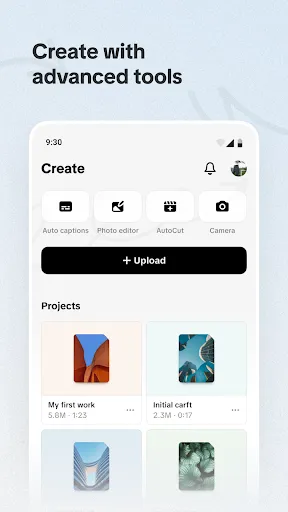
The TikTok Studio App is designed to enhance the content creation experience for users. One of its standout features is the advanced video editing capabilities that allow creators to trim, cut, and merge clips seamlessly. Users can add various effects, filters, and transitions to make their videos more engaging and visually appealing.
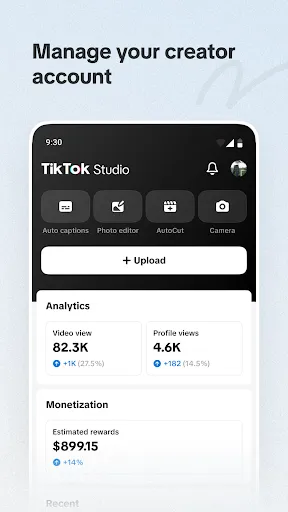
Another key feature is the integration of audio tools, enabling creators to add music, sound effects, or voice-overs directly within the app. The platform also offers a vast library of licensed music, making it easy for users to find the perfect soundtrack for their videos. Additionally, TikTok Studio provides analytics tools that help creators track the performance of their content, offering insights into viewer engagement and reach.
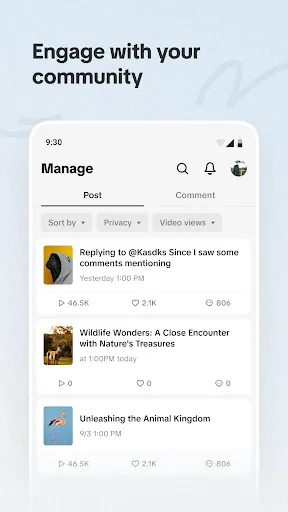
Collaboration features are also prominent, allowing users to work together on projects, share ideas, and co-create content. The app supports various aspect ratios and resolutions, ensuring that videos are optimized for different platforms and devices. Overall, TikTok Studio combines user-friendly tools with powerful functionalities, making it a comprehensive solution for aspiring and established content creators alike.
How to Use TikTok Studio App
Using the TikTok Studio App is straightforward and user-friendly, making it accessible for creators of all skill levels. To start, download the app from your device's app store and create an account or log in with your existing TikTok credentials. Once inside, you'll be greeted with an intuitive interface that guides you through the video creation process.
Begin by selecting the "Create" option, where you can choose to upload pre-recorded videos or capture new footage directly within the app. Utilize the editing tools to trim and enhance your clips, adding effects, text, and music as needed. Don’t forget to explore the extensive library of audio tracks available to set the perfect mood for your content.
After editing, preview your video to ensure it meets your expectations. Once satisfied, you can add a caption, hashtags, and choose your audience settings before sharing your creation. TikTok Studio also allows you to save drafts, enabling you to work on your project over multiple sessions. With these simple steps, anyone can create captivating TikTok videos using the app.
Pros & Cons of TikTok Studio App
The TikTok Studio App comes with several advantages that enhance the user experience. One of the main pros is its robust editing tools, which allow for high-quality video production without needing external software. Additionally, the app's audio library provides a diverse selection of music and sound effects, which can significantly elevate the quality of a creator's content.
Another positive aspect is its user-friendly interface, which simplifies the editing process for novices and experts alike. The collaboration features also encourage community engagement, making it easier for creators to connect and work together. Furthermore, the analytics tools help users understand their audience better and optimize their content accordingly.

 User-friendly interface simplifies video creation. Access to diverse editing tools enhances creativity. Seamless integration with TikTok boosts audience engagement. Real-time collaboration fosters teamwork and innovation. Analytics features improve content performance strategies.
 Limited editing features compared to professional software High learning curve for new users Potential copyright issues with music use Algorithm may limit content visibility
  Google Play
  App Store
 TikTok Studio may collect certain personal information, such as usage statistics and user preferences, to enhance the user experience. However, users should review the privacy policy for detailed information on data collection and usage.
TikTok Studio offers a free version with limited features, as well as a free trial period for its premium subscription, allowing users to explore advanced functionalities before committing.
While some features of TikTok Studio can be used offline, an internet connection is generally required for downloading updates, accessing online resources, and sharing content directly to TikTok.
Users can contact TikTok Studio support through the app's help section or official website, where they can submit inquiries, report issues, or provide feedback directly to the support team.
Users can manage or cancel their TikTok Studio subscription through the app's settings or the official website, where they can find options for subscription management and billing.
Yes, you can modify your account settings directly within the TikTok Studio app under the settings menu.
You can reach TikTok customer service through the app's settings or their official website for support options.
On the login page, click 'Forgot Password?
Open the app, click on 'Log In,' and enter your TikTok credentials or use an associated social media account.
Use the in-app support feature under settings to report issues directly to TikTok's support team.