





This site uses cookies to enhance your user experience. By clicking any link on this site you are giving your consent to our cookie policy. Read more
Reject
Accept All
Bible Offline-KJV Holy Bible

Bible Offline-KJV Holy Bible

4.8
Advertisement(PageType: detail | Position: pre3 )

Information

  • Category: Reference
  • Price: free
  • Age Rating: Everyone
  • Rating:
    4.8
  • Developer: Bíblia Offline
  • Version: 6.3.3.1
Advertisement(PageType: detail | Position: pre4 )
Screenshot 1
Screenshot 2
Screenshot 3
Screenshot 4
Screenshot 5
Screenshot 6
Screenshot 7
Screenshot 8
Screenshot 9

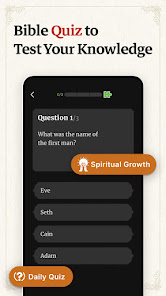
Bible Offline is a mobile application that allows users to read and study the Bible on their mobile devices without an internet connection. It typically includes various versions of the Bible, as well as tools for studying and interpreting the text, such as commentaries, concordances, and dictionaries. The app may also include features such as bookmarking, highlighting, and note-taking to help users engage with the text in a more interactive way.

Features of Bible Offline-KJV Holy Bible App

The Bible Offline-KJV Holy Bible App offers a variety of features to enhance the reading and study of the Holy Bible:

  • Offline Access: Users can access the Bible and its contents offline, without requiring an internet connection.
  • KJV Version: The app features the King James Version (KJV) of the Bible, known for its historical significance and lyrical language.
  • Bible Study Tools: The app provides tools such as cross-references, footnotes, and verse bookmarks to aid in studying and understanding the text.
  • Reading Plans: Users can choose from a selection of reading plans to guide their daily Bible reading and study.
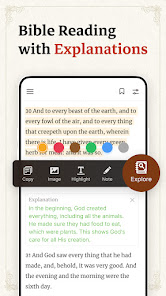
  • Note-taking and Highlighting: The app allows users to take notes and highlight passages for personal reflection and reference.
  • Verse of the Day: Each day, the app presents a new inspirational verse to encourage and uplift users.
  • Search Functionality: Users can search for specific verses or keywords within the Bible to quickly locate relevant passages.


How to Use Bible Offline-KJV Holy Bible App

Using the Bible Offline-KJV Holy Bible App is straightforward:

  1. Download and Install: Find the app in your device's app store and install it on your smartphone or tablet.
  2. Choose the KJV Version: Open the app and select the King James Version (KJV) of the Bible from the available translations.
  3. Navigate the Bible: Browse through the different books, chapters, and verses of the Bible using the intuitive navigation tools.
  4. Access Study Tools: Utilize features such as cross-references, footnotes, bookmarks, and reading plans to enhance your study and understanding of the text.
  5. Take Notes and Highlight: Make use of the note-taking and highlighting features to personalize your study and mark important passages.
  6. Search for Verses: Utilize the search function to find specific verses or search for keywords within the Bible.
  7. Read Daily Verse: Take advantage of the daily verse feature for a daily dose of inspiration and reflection.


Pros & Cons of Bible Offline-KJV Holy Bible App

Pros:

  • Offline Access: The app allows for offline reading of the Bible, making it accessible anytime and anywhere.
  • KJV Version: The inclusion of the King James Version (KJV) provides a traditional and widely-used translation for users.
  • Study Tools: The app offers various study tools, including cross-references, footnotes, and reading plans, to aid in Bible study and comprehension.
  • Personalization: Users can take notes, highlight verses, and create bookmarks, allowing for a personalized reading and study experience.

Cons:

  • Limited Translations: The app focuses on the King James Version (KJV) and may not offer a wide range of alternative translations.
  • Additional Features: Some users may prefer more advanced features, such as multimedia content or commentaries, which may not be available in this app.
  • Interface and Navigation: Depending on the app's design, some users may find the interface and navigation less intuitive or user-friendly.

Pros
  • Access the complete King James Version anytime, anywhere without internet.
  • Enjoy a user-friendly interface for easy navigation and reading.
  • Incorporate powerful search features to find verses quickly and efficiently.
  • Utilize bookmarking to save your favorite passages for future reference.
  • Enhance your spiritual journey with daily devotionals and inspirational content.
Cons
  • Limited access to updated study resources and commentaries.
  • May lack interactive features for deeper engagement.
  • No community support for discussions or shared insights.
Advertisement(PageType: detail | Position: pre5 )

FAQ

Does Bible Offline-KJV Holy Bible collect my personal data?

Bible Offline-KJV Holy Bible prioritizes user privacy and does not collect personal data without consent. However, users should review the privacy policy for detailed information on data handling.

Does Bible Offline-KJV Holy Bible offer a free trial or free version?

Yes, Bible Offline-KJV Holy Bible offers a free version with basic features, allowing users to explore the app before deciding if they want to upgrade to a premium version for additional features.

Does Bible Offline-KJV Holy Bible require an internet connection?

No, Bible Offline-KJV Holy Bible does not require an internet connection to function, as it allows users to download the Bible text for offline reading.

How can I contact support or send feedback for Bible Offline-KJV Holy Bible?

You can contact support or send feedback for Bible Offline-KJV Holy Bible through the app's help section, which provides options to reach customer service via email or a contact form.

How do I manage or cancel my Bible Offline-KJV Holy Bible subscription?

Users can manage or cancel their subscription through the app's settings menu or their account settings in the app store where it was purchased, following the provided instructions for subscription management.

How to use Bible Offline-KJV Holy Bible

How can I contact customer service for the Bible Offline-KJV Holy Bible app?

You can reach customer service through the app's support section or visit the official website for contact information.

How do I find my customer number for the app?

Your customer number is typically found in your account settings within the app.

How do I log in to my account on the Bible Offline-KJV Holy Bible app?

Open the app, navigate to the login section, and enter your registered email and password.

Is there a way to activate the app if required?

If activation is needed, follow the instructions in the app after purchase or registration, usually sent via email.