

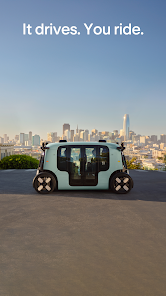
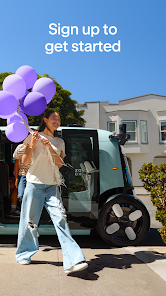
Zoox is an innovative autonomous vehicle company that focuses on creating a fully self-driving vehicle designed for urban environments. One of its standout features is its bi-directional design, allowing the vehicle to travel in either direction without needing to turn around. This unique design enhances maneuverability in tight spaces, making it ideal for city driving.
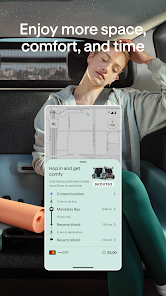
Another key feature of Zoox is its spacious interior, which is designed to prioritize passenger comfort. The vehicle offers a lounge-like atmosphere with ample legroom and seating arrangements that encourage social interaction among passengers. Additionally, Zoox is equipped with advanced AI technology that enables real-time navigation and obstacle detection, ensuring a safe and efficient travel experience.
Furthermore, Zoox vehicles are designed with sustainability in mind, utilizing electric powertrains to reduce carbon emissions. The integration of cutting-edge sensors and cameras allows for a comprehensive understanding of the vehicle's surroundings, enhancing safety and reliability. Overall, Zoox aims to revolutionize urban transportation by providing a seamless, eco-friendly, and user-centric travel solution.
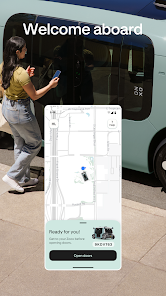
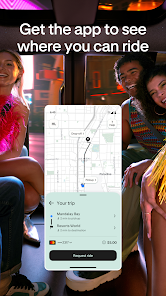
Using Zoox is designed to be a straightforward and user-friendly experience. To begin, users can download the Zoox app from their respective app stores. Once installed, users will need to create an account, providing necessary information such as their name, email, and payment details. After setting up the account, users can easily book a ride by entering their desired pickup and drop-off locations within the app.
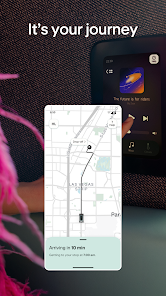
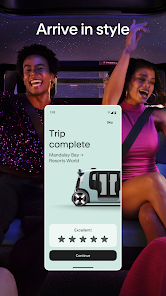
Once a ride is booked, the app will provide real-time updates on the vehicle's arrival time and location. Users can track the vehicle as it approaches, ensuring they are ready for pickup. Upon entering the vehicle, passengers can enjoy the spacious interior and customize their ride experience through the app, adjusting settings such as climate control and entertainment options. After reaching their destination, payment is automatically processed through the app, making the entire experience seamless and efficient.
For any issues or inquiries, users can access customer support through the app, ensuring assistance is readily available. Overall, Zoox aims to provide a hassle-free and enjoyable transportation experience for all users.
Like any technology, the Zoox app comes with its own set of advantages and disadvantages. One of the primary pros is its user-friendly interface, which makes booking rides simple and efficient. The app's real-time tracking feature allows users to monitor their vehicle's arrival, enhancing convenience and reducing wait times. Additionally, the focus on sustainability through electric vehicles appeals to environmentally conscious users, making it a responsible choice for urban transportation.
However, there are some cons to consider. As a relatively new service, Zoox may not yet be available in all urban areas, limiting accessibility for potential users. Furthermore, while the technology is advanced, there may be occasional glitches or delays in service, particularly during peak hours. Users may also have concerns about safety and reliability, as autonomous vehicles are still a developing technology. Overall, while the Zoox app offers a promising solution for urban transportation, potential users should weigh these pros and cons before fully committing to the service.

 Discover seamless navigation Enjoy personalized experiences Access real-time updates easily Connect with a vibrant community Experience a user-friendly design
 Limited availability of features Higher data consumption rates Occasional bugs in the interface Steep learning curve for users
  Google Play
  App Store
 Yes, users can customize their profiles on Zoox by adding personal information, profile pictures, and other details to enhance their visibility and interaction within the app. Check the settings menu to make adjustments.
Yes, Zoox supports integrations with various third-party applications, allowing you to connect tools you already use for a more cohesive workflow. Check the app’s settings or integration options for available connections.
Yes, the Zoox app is designed to be accessible across multiple devices. You can log in to your account on different smartphones, tablets, or computers, allowing for seamless access to your information and tasks.
To create an account on Zoox, download the app, open it, and follow the on-screen instructions to sign up. You may need to provide your email address and set a password. Verification steps may also apply.
You can download the Zoox app from the Apple App Store for iOS devices or the Google Play Store for Android devices. Simply search for "Zoox" and follow the prompts to install the app on your device.
If activation is required, check your email for an activation link sent by Zoox. Click the link to activate your account.
You can reach Zoox customer service by visiting their official website and using the contact form or calling their support number listed in the app.
To log in, open the Zoox app and enter your registered email and password. If you forgot your password, use the "Forgot Password" link.
The customer service number for Zoox can be found in the app's settings or on their official website under the contact section.