





Features of GasBuddy: Find & Pay for Gas App
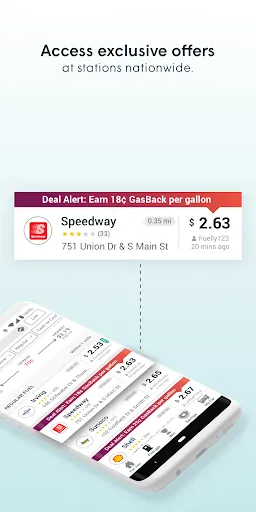
The GasBuddy app is designed to help users locate the best gas prices in their area, making fuel purchases more economical. One of its standout features is the real-time gas price updates, which allow users to find the cheapest fuel options nearby. Additionally, the app includes a map view that visually displays gas stations and their prices, providing a convenient way to navigate to the nearest one.
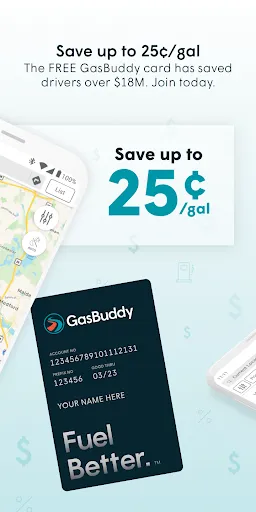
GasBuddy also offers a user-friendly rewards program, where users can earn points by reporting gas prices or by using the app to make purchases. These points can then be redeemed for discounts on fuel. Another feature is the ability to pay for gas directly through the app, allowing for a seamless transaction without needing to leave the car. Furthermore, users can read and write reviews about gas stations, helping others make informed decisions based on their experiences.
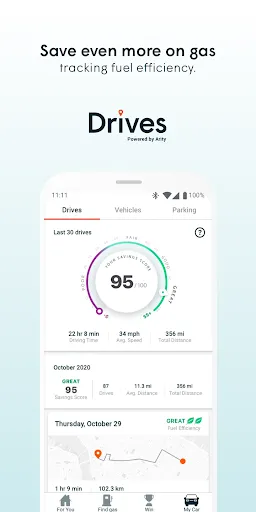
Lastly, GasBuddy includes a trip cost calculator, which estimates fuel costs based on distance and vehicle fuel efficiency, helping users budget for travel expenses effectively.
How to Use GasBuddy: Find & Pay for Gas App
Using the GasBuddy app is straightforward and user-friendly. First, download the app from your device's app store and create an account or sign in using your existing credentials. Once logged in, the home screen will display your current location along with nearby gas stations and their prices. You can set your preferences to filter the results based on fuel type or payment options.
To find the best gas prices, simply tap on a station to view additional details, including user reviews and payment methods. If you wish to pay through the app, select the station, choose your payment method, and follow the prompts to complete your transaction securely. Users can also report gas prices to earn points, which can be redeemed for discounts on future fuel purchases. For those planning a trip, utilize the trip cost calculator to gauge fuel expenses based on your route and vehicle specifications.
Overall, the app’s intuitive interface and comprehensive features make it an essential tool for anyone looking to save money on gas.
Pros & Cons of GasBuddy App
The GasBuddy app comes with several advantages that enhance the user experience. One significant pro is its extensive database of gas prices, which is updated in real-time by users, ensuring accuracy and competitiveness. This feature allows users to always find the most cost-effective refueling options. Additionally, the rewards program incentivizes users to engage with the app by reporting prices and making purchases, ultimately leading to savings on fuel.
Another advantage is the convenience of in-app payments, allowing users to pay without leaving their vehicles. The user-friendly interface and trip cost calculator also add significant value, making it easy for users to plan their fuel expenses effectively. However, there are some downsides. Some users report occasional inaccuracies in the gas prices listed, primarily due to reliance on user submissions. Additionally, while the app is free, some features may require in-app purchases or subscriptions to unlock fully.
Overall, while GasBuddy has its limitations, the benefits it offers, such as saving money and providing convenience, make it a worthwhile tool for many drivers.

 Discover nearby gas prices easily Save money with real-time price comparisons Locate gas stations with convenient payment options Receive rewards for fueling up through the app Plan routes to minimize fuel expenses efficiently
 Inaccurate gas price listings can mislead users Limited availability in rural areas restricts functionality App may have occasional performance issues or crashes User interface can be confusing for new users
  Google Play
  App Store
 GasBuddy: Find & Pay for Gas may collect certain personal data to enhance user experience, including location data and payment information, but it adheres to privacy policies to protect user information.
GasBuddy: Find & Pay for Gas offers a free version that allows users to access many features, while also providing premium subscription options with additional benefits.
Yes, GasBuddy: Find & Pay for Gas requires an internet connection to function properly, as it relies on real-time data to provide users with updated gas prices and location services.
You can contact GasBuddy support or send feedback through the app's help section, or by visiting their official website where you can find additional contact options.
You can manage or cancel your GasBuddy: Find & Pay for Gas subscription through the account settings within the app or by visiting the subscription management section of your app store.
You can reach GasBuddy customer service through the app or their website under the "Help" section for support options.
The customer number is typically available in the app’s settings or help section, or you can reach out via their website for assistance.
Open the app and click on 'Log In'. Enter your email and password. If you don't have an account, you can sign up directly through the app.
Accounts are activated upon registration. If you experience issues, check your email for a confirmation link or contact support for help.