





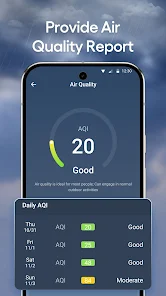
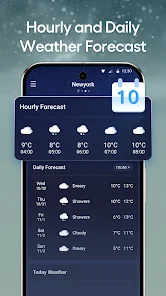
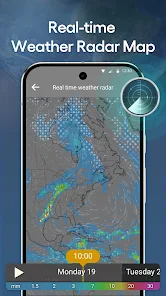

"DailyWeather: Weather Forecast" offers a comprehensive suite of features designed to provide users with accurate and timely weather information. One of its standout features is real-time weather updates, which include current temperature, humidity, wind speed, and atmospheric pressure. The app also provides hourly and daily forecasts, allowing users to plan their activities with confidence. Additionally, it includes radar maps that display precipitation patterns, helping users visualize weather changes in their area.
Another notable feature is the severe weather alerts, which notify users of any extreme weather conditions such as storms or heatwaves, ensuring they stay informed and safe. The app also supports multiple locations, enabling users to check the weather in different cities or regions. Furthermore, the user-friendly interface makes navigation seamless, and customizable widgets allow users to personalize their home screen with relevant weather information. Overall, "DailyWeather" combines functionality with an intuitive design, making it a go-to choice for weather enthusiasts.
Using "DailyWeather: Weather Forecast" is straightforward and user-friendly. Upon downloading and installing the app, users are greeted with a clean interface that prompts them to allow location access. This feature enables the app to provide localized weather updates based on the user's current location. Users can also manually enter different locations to check the weather in various areas, making it versatile for travelers or those with family in different cities.
Once the desired location is set, users can easily navigate through the app to view current weather conditions, hourly forecasts, and extended daily forecasts. Tapping on specific days or times provides more detailed information, including temperature highs and lows, precipitation chances, and wind conditions. Users can also customize notifications for severe weather alerts, ensuring they receive timely updates. Overall, the app's intuitive design and straightforward navigation make it accessible for users of all ages, enhancing their weather-checking experience.
"DailyWeather: Weather Forecast" comes with several advantages that make it a popular choice among users. One of the primary pros is its accuracy in providing real-time weather updates, which is crucial for planning daily activities. The app's user-friendly interface allows for easy navigation, making it accessible for users of all ages. Additionally, the inclusion of severe weather alerts ensures that users are informed about potential hazards, enhancing safety. The ability to check multiple locations is another significant benefit, especially for those who travel frequently or have loved ones in different areas.
However, the app is not without its drawbacks. Some users have reported occasional inaccuracies in weather predictions, particularly for long-term forecasts. Additionally, while the app is generally free, certain features may require in-app purchases or subscriptions, which could deter some users. Furthermore, the app's reliance on location services may raise privacy concerns for those wary of sharing their location data. Overall, while "DailyWeather" offers a robust set of features, potential users should weigh these pros and cons before downloading.

 Stay updated with real-time forecasts and alerts every day. User-friendly interface for easy navigation and quick access to detailed weather data on demand. Personalized notifications for
 Limited geographical coverage Inaccurate real-time updates Cluttered user interface design Ads may disrupt user experience
  Google Play
  App Store
 DailyWeather is free to download and use, but it may include optional in-app purchases or premium features that require a subscription for additional functionalities.
Yes, DailyWeather offers access to historical weather data, allowing users to view past weather conditions for specific dates and locations.
Yes, DailyWeather allows users to set multiple location preferences, enabling them to receive weather updates for their home, work, or any other chosen location.
While DailyWeather requires an internet connection for live updates and data retrieval, it may offer some offline functionalities, such as viewing previously downloaded forecasts.
Yes, DailyWeather supports multiple languages, making it user-friendly for a diverse audience around the world.
You can reach our Customer Service through the app's support section or email us at support
Your Customer Number can be found in the app under Settings > Account Information.
Open the app and tap on 'Log In.' Enter your email and password to access your account.
No activation is necessary; simply download the app and start using it right away.




















