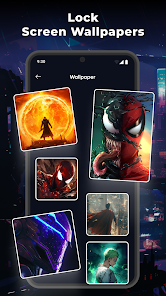
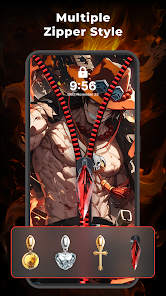
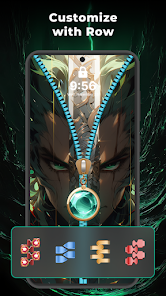
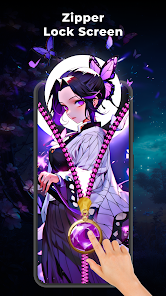
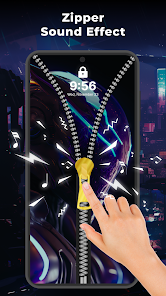
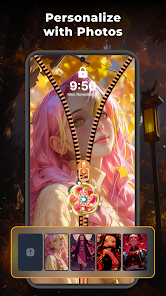
"Zipper Lock Screen: Zip Theme" offers a unique and engaging way to secure your device. One of its standout features is the zipper unlock mechanism, which allows users to unlock their screens by dragging a zipper down. This interactive element adds a fun twist to the traditional lock screen experience. The app also provides a variety of customizable themes, enabling users to personalize their lock screens with different backgrounds, colors, and zipper styles to match their preferences.
Additionally, the app includes a range of sound effects that enhance the unlocking experience, making it more enjoyable. Users can also set up a password or PIN for added security, ensuring that their personal information remains protected. The app is designed to be user-friendly, with a simple interface that makes it easy to navigate through settings and options. Furthermore, it is compatible with most Android devices, making it accessible to a wide audience. Overall, "Zipper Lock Screen: Zip Theme" combines functionality with creativity, providing a delightful way to secure your device.
Using "Zipper Lock Screen: Zip Theme" is straightforward and user-friendly. First, download and install the app from the Google Play Store. Once installed, open the app to access the main settings menu. Here, you can customize your lock screen by selecting your preferred zipper style, background image, and sound effects. The app allows you to preview your choices before applying them, ensuring you are satisfied with the look and feel of your lock screen.
After customizing your settings, enable the lock screen feature by toggling the appropriate option within the app. You may also want to set a password or PIN for additional security. Once everything is set up, simply lock your device, and the new zipper lock screen will appear. To unlock your device, drag the zipper down, and your phone will be ready for use. If you wish to make changes later, you can easily return to the app to adjust your settings as needed.
"Zipper Lock Screen: Zip Theme" comes with several advantages that make it appealing to users. One of the primary benefits is its unique unlocking mechanism, which adds a playful element to the standard lock screen. The app also offers extensive customization options, allowing users to personalize their experience according to their tastes. Additionally, the sound effects and visual themes enhance the overall user experience, making it more enjoyable to interact with the device. The app is lightweight and does not consume significant system resources, ensuring smooth performance.
However, there are some drawbacks to consider. Some users may find the zipper unlocking mechanism less practical compared to traditional methods, especially in situations where quick access is needed. Additionally, while the app is generally user-friendly, some users may encounter difficulties during the initial setup or customization process. There may also be occasional ads that can disrupt the user experience. Overall, while "Zipper Lock Screen: Zip Theme" offers a fun and creative way to secure your device, it may not be suitable for everyone, particularly those who prefer a more conventional approach to device security.

 Zipper Lock Screen: Zip Theme offers a unique and stylish way to secure your device. Enjoy a variety of colorful designs to personalize your lock screen. The easy-to-use zipper feature ensures quick access to your apps. Experience smooth animations that enhance your unlocking experience. Lightweight and fast, this app won’t drain your battery.
 Limited customization options Can be slow to respond Ads can be intrusive May drain battery quickly
  Google Play
  App Store
 Yes, the Zipper Lock Screen: Zip Theme app offers various customization options. You can choose from different zipper designs, background images, and themes to suit your personal style. The app allows you to preview changes before applying them, ensuring that your lock screen looks exactly how you want it.
The app primarily focuses on providing a zipper unlock mechanism rather than traditional password or PIN security. However, you can set your device's built-in lock security (like PIN, password, or fingerprint) alongside the zipper lock for enhanced security.
Yes, the Zipper Lock Screen: Zip Theme app allows users to upload their own images to be used as backgrounds. You can choose from your gallery or camera roll, making it easy to personalize your lock screen with photos that are meaningful to you.
Generally, the Zipper Lock Screen: Zip Theme app is designed to be battery-efficient. However, like any app, the overall battery consumption may depend on your device settings and usage. To optimize battery life, ensure that your device is updated and manage background processes effectively.
Yes, the Zipper Lock Screen: Zip Theme app offers support for multiple languages to cater to a diverse user base. You can change the language settings within the app to find your preferred language for a more user-friendly experience.
You can reach customer service by visiting the app's support page or emailing support
You can log in using your email address and password associated with your account, or through social media login options if available.
Activation is automatic upon installation; simply follow the on-screen instructions to set it as your lock screen.
The customer number is typically provided within the app under the 'Contact Us' section or on the official website.