



Visit the website below to find products which are supported by this app. When using a printer or scanner that’s not listed on the website, please use instead Epson iPrint for printers or Document Scan for scanners. Epson Smart Panel will not be able to find or connect to your product unless it’s on the website’s list of supported products.
https://support.epson.net/appinfo/smartpanel/guide/en/
High performance, easy-to-use mobile command center for your Epson wireless printer or scanner1. Easily set up, monitor and operate your Epson product from the convenience of your mobile device with this powerful new tool.
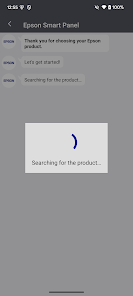
- Easily set up your Epson product on your Wi-Fi
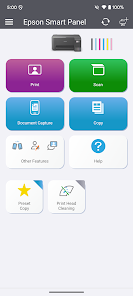
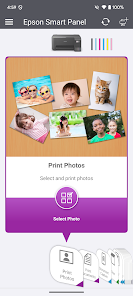
- Innovative action tiles make your Epson Product simple and quick to use
- Fits like a glove -- auto configuration and customization tailors the experience
- Receive the support you need - register, get supplies, or find help all in one convenient place
- One interface for your Epson Printers and Scanners -- auto configuration tailors the app's functions to your device.
1. Requires Epson Smart Panel app download and a compatible smart device. Data usage fees may apply. For more information please visit www.epson.com for support.

 Easy remote control of your Epson devices User-friendly interface for simple navigation Access to advanced features and settings Real-time status updates for efficient monitoring Seamless connectivity with multiple devices
 Limited compatibility with older Epson devices User interface can be confusing Frequent updates may disrupt functionality Connectivity issues with certain networks
  Google Play
  App Store
 Epson Smart Panel may collect certain usage data to improve app functionality and user experience, but it is designed with privacy in mind and adheres to applicable data protection regulations.
Yes, Epson Smart Panel is available as a free download with basic functionality, allowing users to explore its features without a subscription.
While a stable internet connection can enhance functionality, particularly for cloud features, Epson Smart Panel can still operate over a local network without internet access for basic printing and scanning tasks.
Users can contact Epson support through the app’s help section, visit the Epson website for customer service, or send feedback directly through the app's feedback option.
Subscription management and cancellation can be done directly through the app or via the platform's app store settings, depending on how the subscription was purchased.
Some advanced features may require in-app purchases or subscriptions. Follow the prompts in the app to activate them.
You can reach Epson customer service through their official website or by calling their support number listed in the app.
Your customer number can usually be found in your account settings within the app or on your purchase receipt.
Open the app and tap on the "Log In" button. Enter your registered email and password to access your account.
No activation is required for the basic features of the app. Simply download and log in to use it.



















