

This site uses cookies to enhance your user experience. By clicking any link on this site you are giving your consent to our cookie policy. Read more
Reject
Accept All
Capital One UK

Capital One UK

4.2
Advertisement(PageType: detail | Position: pre3 )

Information

  • Category: Finance
  • Price:
  • Age Rating: 4+
  • Rating:
    4.2
  • Developer: Capital One (Europe) plc
  • Version: 8.93.9585
Advertisement(PageType: detail | Position: pre4 )
Screenshot 1
Screenshot 2
Screenshot 3
Screenshot 4
Screenshot 5
Screenshot 6
Screenshot 7
Screenshot 8
Screenshot 9
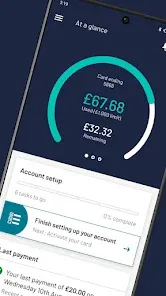
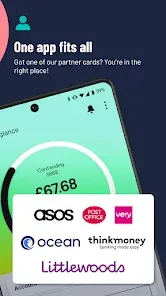
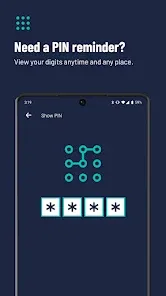
The Capital One UK Mobile App is a convenient and secure way for customers to manage their finances on the go. With this app, users can easily view their account balances, transactions, and statements, as well as make payments and transfers. The app also offers features such as spending notifications, which alert users when they are nearing their credit limit or have made a large purchase. Additionally, customers can set up and manage Direct Debits, view their credit score, and access customer support through the app. With its user-friendly interface and robust features, the Capital One UK Mobile App provides a seamless banking experience for customers.

Features of Capital One UK App

The Capital One UK App offers a range of features to help users manage their finances conveniently and securely. Some of the key features include:

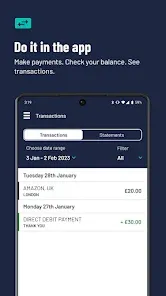
  • Account Overview: Users can view their account balances, transactions, and payment due dates at a glance.
  • Transaction History: The app provides a detailed transaction history, allowing users to track their spending and identify any unauthorized activity.
  • Bill Payments: Users can easily make payments towards their credit card bills directly from the app, ensuring timely payments and avoiding late fees.
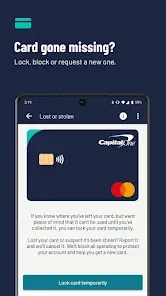
  • Card Management: The app allows users to activate new cards, report lost or stolen cards, and request replacement cards.
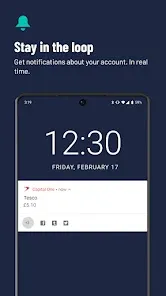
  • Notifications: Users can set up personalized notifications to receive alerts for payment due dates, large transactions, and account activity.
  • Security Features: The app incorporates advanced security measures, including biometric authentication (such as fingerprint or face recognition) and two-factor authentication, to protect user information and prevent unauthorized access.


How to Use Capital One UK App

Using the Capital One UK App is simple and user-friendly. Here's a step-by-step guide:

  1. Download and install the Capital One UK App from the App Store or Google Play Store.
  2. Open the app and sign in using your Capital One UK online banking credentials.
  3. Once logged in, you will be presented with an account overview, displaying your balances and recent transactions.
  4. To view more details or perform specific actions, navigate through the app using the menu options or icons.
  5. To make a payment, select the "Payments" option and follow the prompts to enter the payment amount and select the payment source.
  6. For additional assistance or support, access the app's help section or contact Capital One UK customer service.


Pros & Cons of Capital One UK App

Pros:

  • User-friendly interface and intuitive navigation make it easy to manage finances.
  • Convenient access to account information, transactions, and payment options.
  • Advanced security features provide peace of mind and protect against fraud.
  • Personalized notifications help users stay on top of their finances.

Cons:

  • The app may require regular updates to maintain optimal performance.
  • Some users may prefer additional features, such as budgeting tools or spending analysis.
  • Occasional technical glitches or connectivity issues may disrupt app functionality.

Pros
  • Competitive interest rates on savings accounts boost your returns.
  • User-friendly mobile app simplifies banking on the go.
  • No foreign transaction fees make travel spending hassle-free.
  • Responsive customer service is available to assist you anytime.
  • Innovative financial tools help you manage your budget effectively.
Cons
  • Limited branch access can hinder in-person support.
  • High fees on certain account features may deter customers.
  • Customer service response times can be slower than competitors.

Advertisement(PageType: detail | Position: pre5 )

FAQ

Can I submit suggestions or feedback to Capital One UK?

Yes, users can submit suggestions or feedback directly through the app or by contacting Capital One's customer service.

Does Capital One UK collect my personal data?

Yes, the app collects personal data to provide services, enhance user experience, and ensure security, but it adheres to strict privacy policies.

Does Capital One UK support offline use?

Some features of the Capital One UK app may be accessible offline, but full functionality typically requires an internet connection for real-time updates and transactions.

How do I cancel my Capital One UK subscription?

Since there is no subscription fee for the app, you do not need to cancel anything; however, you can close your account with Capital One if you wish.

How much does a subscription to Capital One UK cost?

There is no subscription cost for using the Capital One UK app; it is free for all users with a Capital One account.

How to use Capital One UK

Can I activate my Capital One account online?

Yes, you can activate your Capital One account online by logging in and following the activation prompts on your dashboard.

Can I change my login details for my Capital One account?

Yes, you can change your login details by logging in to your account and navigating to the settings section to update your username or password.

How can I contact Capital One UK customer service?

You can reach Capital One UK customer service by calling the number on the back of your card or visiting our website for chat support.

How do I contact customer service if I can't log in?

If you can't log in, you can still contact customer service by calling the number provided on the website or use the chat feature for immediate help.

How do I log in to my Capital One account?

To log in, visit the Capital One website or app, enter your username and password, and click 'Log in' to access your account.