


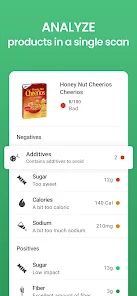
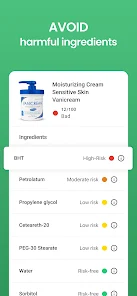

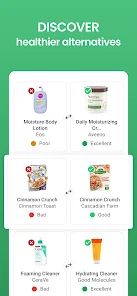
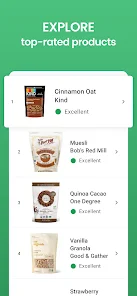
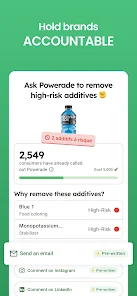
Yuka is a mobile app that allows users to scan food and cosmetic products to get detailed information about their ingredients and nutritional values. The app also provides ratings for each product based on its ingredients and nutritional values. Yuka is available for both iOS and Android devices.
1. Scan barcodes: Yuka allows users to scan barcodes of food and cosmetic products to get detailed information about their ingredients, nutritional values, and potential health risks. 2. Product ratings: Yuka provides ratings for food and cosmetic products based on their ingredients and nutritional values. 3. Shopping list: Yuka allows users to create shopping lists of products they want to buy and keep track of their purchases. 4. Personalized recommendations: Yuka provides personalized recommendations for food and cosmetic products based on the user’s preferences. 5. Community: Yuka has a community of users who can share their experiences and opinions about products. 6. Alerts: Yuka sends alerts when a product’s rating changes or when a new product is added to the database. 1. Download the Yuka app: Yuka is available for free on both the App Store and Google Play. 2. Create an account: You can create an account with your email address or with your Facebook or Google account. 3. Scan a product: Open the app and scan the barcode of the product you want to check. 4. View the results: Yuka will give you a score for the product, based on its ingredients and nutritional value. It will also provide you with detailed information about the product, including its ingredients, nutritional values, and potential health risks. 5. Make an informed decision: Use the information provided by Yuka to make an informed decision about whether or not to purchase the product. Pros: 1. Yuka provides detailed information about food and cosmetic products, including nutritional values, ingredients, and potential allergens. 2. It allows users to easily compare products and make informed decisions about what to buy. 3. The app is free to download and use. 4. It is available in multiple languages, making it accessible to a wider audience. 5. It has a barcode scanner that makes it easy to scan products and get information quickly. Cons: 1. The app is only available in certain countries, so not everyone can access it. 2. It does not provide detailed information about all products, so some products may not be accurately assessed. 3. It is not always up-to-date with the latest product information. 4. It does not provide detailed information about the environmental impact of products. 5. It does not provide detailed information about the ethical sourcing of products.Features
How to use Yuka - Food & Cosmetic scanner Mobile App?
Pros & Cons

 Easily scan products for health ratings Discover natural alternatives for better choices Access detailed ingredient information instantly Make informed decisions for your family’s wellness Track personal preferences and favorites effortlessly
 Limited database for certain local products Scanning accuracy can vary significantly User ratings may not reflect true quality No comprehensive ingredient explanations provided
 Yuka is designed to prioritize user privacy and does not collect personal data unless you choose to share it, such as when creating an account or providing feedback.
Yuka offers a free version with basic features, allowing users to scan products and access essential information, while additional features may require a subscription.
Yes, Yuka requires an internet connection to access its database for real-time product information and updates, although some features may be available offline once data is cached.
You can contact Yuka support or send feedback via the app’s settings menu or by visiting their official website, where you can find additional contact information and support resources.
You can manage or cancel your Yuka subscription through your device’s app store settings, where you can follow the prompts for subscriptions and billing.
You can reach Yuka's customer service via the app's contact form or through their official website. Look for the "Help" section for more details.
Open the app, tap on "Log In," and enter your registered email and password. If you don’t have an account, you can sign up directly from the app.
No activation is required; simply download the app and start scanning products immediately. Registration is optional for saving preferences.
Yuka does not provide a specific customer number; instead, use the in-app support or the contact form on their website for assistance.










 Google Play
  App Store