



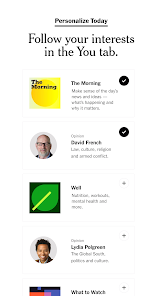





The New York Times Mobile App is a free app for iOS and Android devices that provides access to the latest news and features from The New York Times. The app includes breaking news alerts, in-depth coverage of current events, and access to the full range of Times content, including opinion pieces, multimedia, and more.
1. Breaking News: The New York Times provides up-to-the-minute coverage of news from around the world. 2. Multimedia: The New York Times offers a variety of multimedia content, including videos, podcasts, and interactive graphics. 3. Opinion: The New York Times publishes opinion pieces from a variety of perspectives, including those of its own staff and contributors. 4. Special Sections: The New York Times publishes special sections on topics such as politics, business, health, and culture. 5. Subscription Options: The New York Times offers a variety of subscription options, including digital-only access and print + digital access. 6. Crosswords: The New York Times publishes a daily crossword puzzle, as well as a variety of other puzzles. 7. Archive: The New York Times maintains an extensive archive of articles, photos, and videos. 8. Apps: The New York Times offers apps for iOS and Android devices, as well as a website optimized for mobile devices. 1. Download the New York Times Mobile App from the App Store or Google Play. 2. Open the app and create an account. 3. Select the topics you’re interested in and customize your news feed. 4. Read the latest news stories and browse through the different sections. 5. Save stories to read later or share them with friends. 6. Access the app’s settings to customize your experience. 7. Enjoy the New York Times Mobile App! Pros: 1. Easy to use and navigate. Cons: 1. Limited customization options for the home page.Features
How to use The New York Times Mobile App?
Pros & Cons
2. Offers a wide range of content from the New York Times, including breaking news, opinion pieces, and multimedia.
3. Push notifications alert users to breaking news and other important stories.
4. Ability to save articles for later reading.
5. Ability to customize the app to show only the topics and sections of interest.
2. Ads can be intrusive and distracting.
3. Some users have reported difficulty with the app crashing or freezing.
4. Limited ability to share articles with friends and family.
5. Limited ability to comment on articles.

 In-depth analysis of current events enhances understanding of complex issues. Timely updates keep you informed about breaking news as it happens. Expert journalists provide reliable and trustworthy reporting on global affairs. Diverse perspectives foster a well-rounded view of international topics. Comprehensive coverage connects local stories to global contexts effectively.
 Limited access to articles without a subscription. Editorial bias can influence news coverage. High subscription costs may discourage potential readers.
  Google Play
  App Store
 Yes, users can submit suggestions or feedback through the app's settings or help section, where they can find contact information for customer support.
Yes, the app may collect personal data to enhance user experience, including usage statistics and preferences, in accordance with their privacy policy.
Yes, users can download articles for offline reading, allowing them to access content without an internet connection.
Users can cancel their subscription through their account settings within the app or via the platform where they purchased the subscription, such as the App Store or Google Play.
Subscription prices may vary based on chosen plans, but typically start around a monthly fee with options for annual subscriptions as well.
Customer numbers are unique and cannot be changed. If you need assistance, please contact customer service.
Log in to your account and go to "My Account" to view your subscription status and details.
You can reach customer service by calling the number on our website or using the chat feature in your account.
Log in to your account, go to the "Account Settings," and you can update your personal information there.
Visit the NYTimes website and click "Log In" at the top right. Enter your email and password to access your account.