

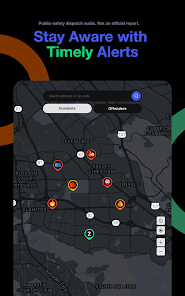
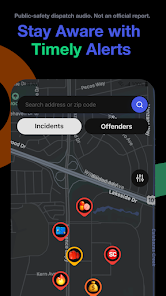
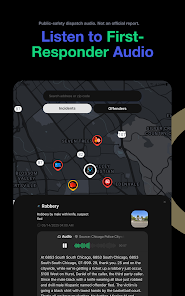
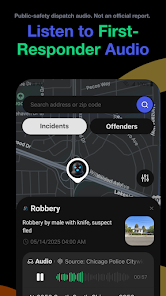
"CrimeRadar: Dispatch Alerts" is a cutting-edge application designed to keep users informed about criminal activities in their vicinity. One of its standout features is real-time alerts, which notify users immediately when a crime is reported in their area. This feature enhances personal safety by allowing users to stay aware of potential threats. Additionally, the app provides detailed crime reports, including the type of crime, location, and time, enabling users to make informed decisions about their surroundings.
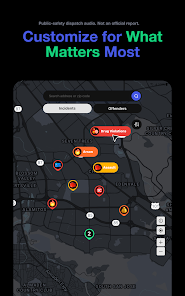
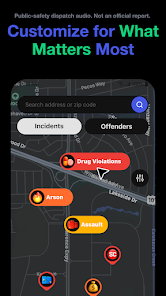
Another notable feature is the interactive map that displays crime hotspots, helping users visualize areas with higher crime rates. The app also includes a community feedback section, where users can share their experiences and insights, fostering a sense of community vigilance. Furthermore, "CrimeRadar" offers customizable alert settings, allowing users to choose the types of crimes they want to be notified about, ensuring that the information is relevant to their specific concerns. Overall, the app combines technology and community engagement to enhance public safety.
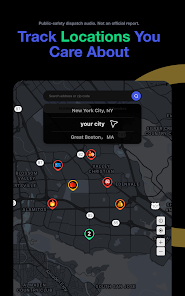
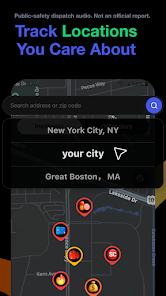
Using "CrimeRadar: Dispatch Alerts" is straightforward and user-friendly. After downloading the app from your device's app store, you will need to create an account or log in if you already have one. Once logged in, you can set your location preferences to receive alerts specific to your area. The app will prompt you to customize your alert settings, allowing you to select the types of crimes you wish to be notified about, such as theft, assault, or vandalism.
After setting your preferences, you will start receiving real-time alerts directly to your device. The interactive map feature allows you to explore crime data visually, making it easy to identify hotspots in your neighborhood. You can also engage with the community feedback section to share your experiences or read about others' encounters. Regularly checking the app will keep you informed about any new developments in your area, ensuring that you remain vigilant and aware of your surroundings.
Like any application, "CrimeRadar: Dispatch Alerts" has its advantages and disadvantages. One of the primary pros is its real-time alert system, which provides users with immediate information about criminal activities, enhancing personal safety. The app's interactive map feature is another significant advantage, as it allows users to visualize crime patterns and identify safer routes. Additionally, the community feedback section fosters a sense of shared responsibility among users, encouraging them to stay informed and vigilant.
However, there are some cons to consider. The accuracy of the crime data may vary depending on the sources used, which could lead to misinformation. Some users may also find the volume of alerts overwhelming, especially in high-crime areas, leading to alert fatigue. Furthermore, the app's effectiveness relies on user engagement; if community members do not actively participate in sharing information, the app's value may diminish. Overall, while "CrimeRadar" offers valuable features for enhancing safety, users should be aware of its limitations.

 Stay informed with real-time alerts Track local crime activity easily User-friendly interface for all Customize alerts to your needs Connect with your community quickly
 Limited geographical coverage Delayed alert notifications User interface can be clunky Inaccurate crime data reports
  Google Play
  App Store
 Absolutely! The app allows users to customize their alert preferences based on specific types of incidents, such as thefts, assaults, or traffic violations. Users can also set their preferred geographical boundaries to receive alerts relevant to their immediate environment.
While the primary function of the app is to provide alerts, some versions may include features that allow users to report incidents or suspicious activities directly through the app. This helps create a community-driven approach to safety and crime reporting.
Yes, users can adjust their location settings within the app to receive alerts for different areas. This is particularly useful for individuals who travel frequently or want to stay informed about crime trends in other neighborhoods or cities.
Users can typically find a feedback or support section within the app’s settings menu. This allows them to report issues, suggest improvements, or ask questions directly to the app developers. Additionally, users may find contact information or links to social media for further support.
The app uses push notifications to deliver alerts directly to users' devices. When a new incident is reported in the selected area, the app sends an immediate notification to keep users updated on potential threats or criminal activities. Users can also check the app for a historical view of recent incidents.
You can contact customer service by visiting the app's settings or help section, where you'll find support options and a contact form.
To activate your account, follow the link sent to your email after registration and complete the verification process.
Open the app and enter your registered email and password. If you are a new user, you may need to create an account first.
The customer service number is typically listed in the app's help section or on the official website. Please check there for the most accurate information.