The Pizza Hut app offers food delivery and takeout from Pizza Hut locations. You can order your favorite pizza, pasta, and wings with a few clicks. The app also stores your order history and preferences, so you can reorder your favorite meal with ease. Plus, you can pay with a credit card or PayPal directly from the app.
Download the official Pizza Hut app for the easiest way to order your favorite pizza, wings, desserts and more! We’ve added contactless ordering features, so you and your family can get the pizza you love without worry. Our app is designed for pizza lovers, making fast food delivery and takeout even easier. Check out our menu, find deals, save orders and earn free pizza with Hut Rewards®.
• Order contactless delivery, takeout or curbside pickup
• Check in for curbside pickup with one simple click
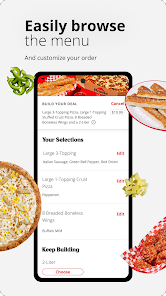
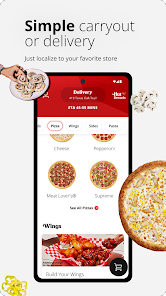
• Access the full Pizza Hut menu, discover new menu items and view local deals
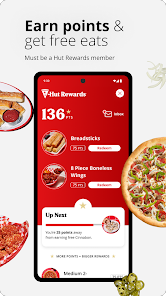
• Stay up-to-date with your Hut Rewards® points and redeem free pizza, wings and more with ease
• Customize your own pizzas with the easy-to-use Pizza Builder
• Reorder in three easy taps
• Track your order with the Pizza Hut Delivery Tracker
• Place future orders up to 7 days in advance
• Use guest checkout to easily order without an account
• Find Pizza Hut locations near you
• Pay with cash, card or Pizza Hut gift card
• Order within the 50 United States territories and possessions excluding Puerto Rico and the U.S. Virgin Islands

 Convenient delivery right to your doorstep for ultimate ease. Enjoy a wide variety of delicious pizzas and sides. Customizable options to suit every taste and dietary need. Fast service ensures your meal arrives hot and fresh. Reliable online ordering makes it easy to place your order.
 Limited menu options may not satisfy diverse dietary preferences Higher prices compared to local pizzerias can deter budget-conscious customers Delivery times can be inconsistent, leading to cold or delayed meals
  Google Play
  App Store
 Yes, users can submit feedback and suggestions directly through the app or via Pizza Hut's customer service channels.
Yes, the app collects personal data such as order history, payment information, and location to enhance user experience and provide personalized services.
The app requires an internet connection for most functionalities, but some content may be accessible offline once loaded.
Since there is no subscription model, users simply stop using the app when they no longer wish to order; there are no cancellation steps needed.
There is no subscription fee for using the app; users pay only for the food and services they order.
No, customer numbers cannot be changed through account settings. Please contact customer service for help.
No, customer numbers are unique and cannot be changed. For assistance, please contact customer service.
You can reach our customer service at the number listed on our website or through the chat feature in the app.
You can activate your account by clicking the link sent to your email after registration. If you don't see it, check your spam folder.
To log in, visit our website or app and enter your email and password. If you’ve forgotten your password, use the "Forgot Password" link.