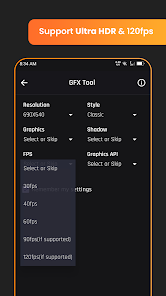
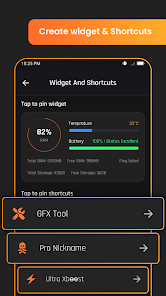
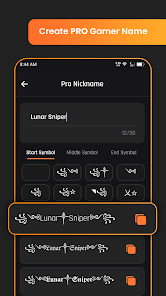
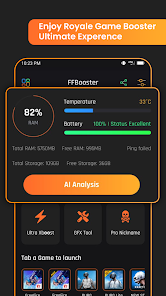
"Game Booster GFX Fire Fix" is a powerful application designed to enhance gaming performance on mobile devices. One of its standout features is the ability to optimize graphics settings, allowing users to adjust resolution and frame rates for a smoother gaming experience. This is particularly beneficial for resource-intensive games, as it helps reduce lag and improve overall gameplay.
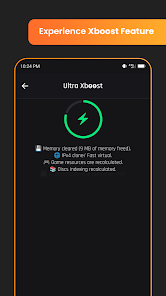
Another notable feature is the one-tap boost functionality, which allows users to quickly free up RAM and close background applications that may be consuming system resources. This ensures that the game runs more efficiently without interruptions. Additionally, the app provides a user-friendly interface, making it easy for gamers of all skill levels to navigate and utilize its features effectively.
Furthermore, "Game Booster GFX Fire Fix" includes a game library that allows users to manage and launch their favorite games directly from the app. It also offers various customization options, enabling players to tailor their gaming experience according to their preferences. Overall, this app is a comprehensive tool for gamers looking to enhance their mobile gaming performance.
Using "Game Booster GFX Fire Fix" is a straightforward process that can significantly enhance your gaming experience. First, download and install the app from a trusted source, such as the Google Play Store. Once installed, open the application, and you will be greeted with a user-friendly interface that displays your installed games.
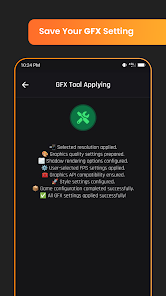
To begin optimizing a game, simply select it from the list provided. The app will present you with various options to adjust graphics settings, including resolution and frame rate. Choose the settings that best suit your device's capabilities and your personal preferences. After making your selections, tap the "Boost" button to free up RAM and close any unnecessary background applications.
Once the optimization process is complete, the app will launch your selected game, allowing you to enjoy an enhanced gaming experience. For ongoing performance improvements, consider using the app regularly before gaming sessions to ensure your device is running at its best. With these simple steps, you can maximize your gaming performance effortlessly.
Like any application, "Game Booster GFX Fire Fix" comes with its own set of advantages and disadvantages. One of the primary pros is its ability to significantly improve gaming performance by optimizing graphics settings and freeing up system resources. This can lead to a smoother gaming experience, especially for high-demand games. Additionally, the app's user-friendly interface makes it accessible for gamers of all levels, allowing for easy navigation and customization.
Another advantage is the one-tap boost feature, which simplifies the process of preparing your device for gaming. Users can quickly close background applications and optimize settings without needing extensive technical knowledge. However, there are some cons to consider. Some users may find that the app does not work effectively on all devices, leading to inconsistent performance improvements. Additionally, frequent use of the app may lead to battery drain, as it requires additional resources to function.
Lastly, while the app is generally safe, users should be cautious about downloading it from unofficial sources, as this could expose their devices to malware. Overall, "Game Booster GFX Fire Fix" offers valuable features for gamers, but potential users should weigh the pros and cons before deciding to use it.

 Experience smoother gameplay Enhance graphics performance Reduce lag and stuttering Optimize device resources Easy-to-use interface
 Limited compatibility issues May not significantly improve FPS Potential for system instability Ads can be intrusive for users
  Google Play
  App Store
 Yes, the Game Booster GFX Fire Fix app allows users to customize various settings based on their preferences. Users can adjust graphics quality, resolution, and other parameters to optimize performance according to their device capabilities and gaming needs.
The Game Booster GFX Fire Fix app can be used on a wide range of mobile games, particularly those that are graphics-intensive. However, the effectiveness may vary depending on the game's optimization and the device's hardware capabilities. Some games might not see significant improvements.
No, you do not necessarily need a high-end device to use the Game Booster GFX Fire Fix app. While the app is designed to enhance performance, even mid-range or entry-level devices can benefit from its optimizations. However, the extent of improvement may vary based on the device's specifications.
The Game Booster GFX Fire Fix app does not require a constant internet connection to function. However, some features, such as downloading updates or accessing online settings, may need an internet connection. For offline gaming, the app can still optimize performance.
Uninstalling the Game Booster GFX Fire Fix app is straightforward. Simply go to your device's settings, navigate to the 'Apps' section, find the app, and select 'Uninstall.' Alternatively, you can long-press the app icon on your home screen and drag it to the uninstall option that appears.
You can reach customer service through the app's support section or visit their official website for assistance.
To activate premium features, purchase a subscription through the app’s settings and follow the prompts to complete the transaction.
Open the app and enter your credentials or sign in using your linked social media account.
The app typically does not provide a direct phone number; support is usually handled via email or in-app chat.