



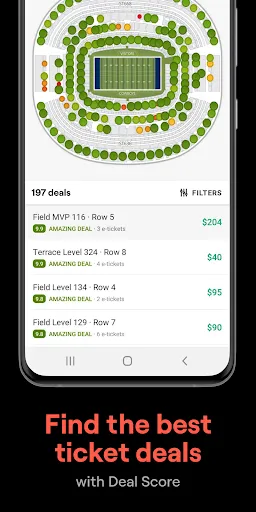
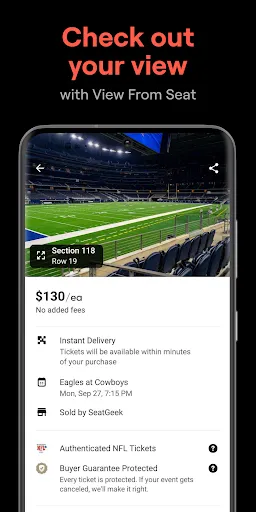
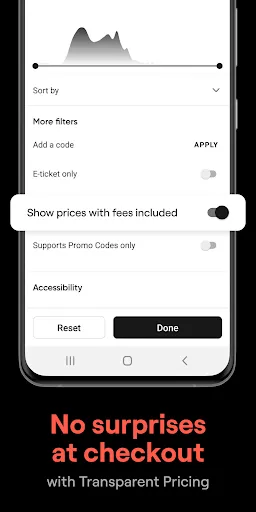

SeatGeek is a versatile platform that offers a range of features designed to enhance the ticket-buying experience for users. One of its standout features is the interactive seat map, which allows users to visualize the seating arrangements before making a purchase. This ensures that buyers can choose the best available seats according to their preferences. Another key feature is the integrated ticket comparison tool, which helps users find the best deals by comparing prices across various vendors. This transparency in pricing empowers users to make informed decisions about their purchases. Additionally, SeatGeek’s mobile app enhances accessibility, allowing users to buy tickets on-the-go, manage their orders, and receive real-time updates about events. Furthermore, the platform includes a user-friendly interface and detailed event information, including artist backgrounds and venue details, enriching the overall user experience. The SeatGeek Guarantee also adds a layer of security, ensuring that users receive valid tickets or a full refund if something goes wrong. Collectively, these features make SeatGeek a comprehensive solution for event ticketing. Using SeatGeek to purchase tickets is a straightforward process that can be completed in just a few steps. First, navigate to the SeatGeek website or open the mobile app. You can start your search by entering the name of the event, artist, or venue in the search bar. This will bring up a list of relevant events happening in your area or across the country. Once you find the event you’re interested in, click on it to view detailed information, including ticket prices, seating options, and event dates. Utilize the interactive seat map to choose your desired seats based on your budget and preferred viewing experience. After selecting your seats, you can proceed to checkout, where you’ll need to provide your payment details. Once the purchase is complete, you’ll receive a confirmation email with your ticket details. If you have the SeatGeek app, you can also access your tickets directly from your mobile device, making entry to the event seamless. Overall, the platform is designed for ease of use, ensuring that fans can quickly and efficiently secure their tickets to any event. SeatGeek offers several advantages that make it a popular choice for purchasing event tickets. One major pro is its comprehensive ticket comparison feature, which allows users to find the best prices available across multiple vendors. Additionally, the interactive seat map provides a clear view of seating options, making it easier for users to select their preferred spots. The platform also features a user-friendly interface, making navigation simple, and the mobile app allows for convenient ticket management on-the-go. Another significant advantage is the SeatGeek Guarantee, which assures buyers of valid tickets and a refund if any issues arise. However, there are some drawbacks to consider. Fees can sometimes be higher than those found on other ticketing platforms, which may deter budget-conscious consumers. Additionally, availability can vary, as popular events often sell out quickly. Lastly, while the platform offers a broad selection of events, some niche or local happenings may not be listed. Weighing these pros and cons can help users make an informed decision when choosing SeatGeek for their ticketing needs.Features of SeatGeek – Tickets to Events
How to Use SeatGeek – Tickets to Events
Pros & Cons of SeatGeek – Tickets to Events

 Find tickets for a wide variety of events easily and quickly. Enjoy competitive pricing with transparent fee structures for better budgeting. Access interactive seating charts to select your ideal view and location. Receive personalized recommendations tailored to your interests and preferences. Benefit from a user-friendly mobile app for convenient ticket management on-the-go.
 Limited availability for popular events can lead to higher prices. User interface may feel cluttered and confusing at times. Customer service response times can be slow during peak periods.
  Google Play
  App Store
 Yes, users can submit suggestions or feedback through the app's help or support section, or by contacting customer service directly.
Yes, SeatGeek – Tickets to Events collects personal data, such as your name, email address, and payment information, to process transactions and enhance your user experience.
The app primarily requires an internet connection for ticket purchases and updates, but users can access their purchased tickets offline once they are downloaded to the app.
Since there is no subscription for SeatGeek – Tickets to Events, there is no cancellation process. Users can simply stop using the app at any time.
SeatGeek – Tickets to Events does not have a subscription model; it allows users to purchase tickets on a pay-per-event basis.
Yes, you can activate your account through the SeatGeek mobile app by following the prompts after downloading.
You can reach our customer service team through the help section on our website or by emailing support
For account activation help, visit the activation page or contact customer service for detailed guidance.
Once logged in, go to your account settings, and you can update your email address from there.
To log in, visit our website or app and enter your email and password in the login section.