

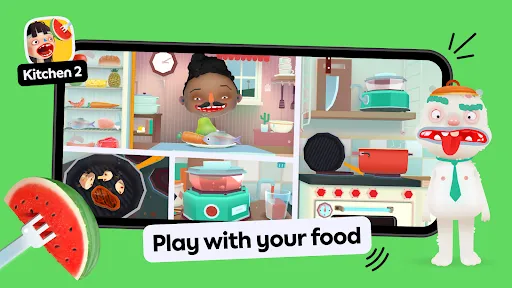
Toca Kitchen 2 is a mobile app designed for children ages 4 and up. It is a cooking game that allows kids to explore their creativity in the kitchen. Players can prepare meals for four hungry characters, each with their own likes and dislikes. Kids can chop, fry, boil, bake, and mix ingredients to create unique dishes. The game also features fun kitchen tools, such as a blender, a juicer, and a popcorn machine. With no rules or stress, Toca Kitchen 2 encourages kids to express themselves and have fun in the kitchen.
1. Interactive Cooking: Cook up a storm in the kitchen with a variety of ingredients. Chop, fry, bake and blend your way to a delicious meal. 2. Creative Play: Create your own recipes and explore the kitchen with no rules or stress. 3. Fun Characters: Meet four fun characters who will react to your cooking in different ways. 4. Variety of Foods: Cook up a variety of dishes from around the world, including sushi, tacos, pizza and more. 5. Kitchen Tools: Use a variety of kitchen tools to prepare your meals, including a blender, frying pan, oven and more. 6. Fun Animations: Enjoy fun animations and sound effects as you cook. 7. Parental Controls: Parents can control the app with a PIN code and set time limits. Toca Kitchen 2 is a cooking and food-themed educational game for kids that is available on mobile devices. In the game, players can explore a virtual kitchen and use a variety of ingredients to create and serve dishes to a cast of hungry characters. Here is an overview of the gameplay in Toca Kitchen 2: Players start by choosing a character to cook for. Each character has their own likes and dislikes, which can influence the dishes they will enjoy. Players can then explore the virtual kitchen, which is filled with a variety of ingredients, cooking utensils, and other interactive objects. Players can use the ingredients to create a variety of dishes by cutting, cooking, and mixing them in different ways. For example, players can chop vegetables, fry eggs, or bake a cake using the interactive kitchen tools. Once a dish is completed, players can serve it to the character they are cooking for and see how they react to it. Characters may be pleased with the dish and ask for seconds, or they may be unhappy and refuse to eat it. Players can also use the interactive elements in the kitchen to play around and experiment with different cooking techniques and ingredients. For example, players can mix together unusual ingredients to see what kind of dish they create, or they can use the kitchen tools to play with their food. 1. Download the Toca Kitchen 2 app from the App Store or Google Play. 2. Open the app and select a character to cook for. 3. Choose from a variety of ingredients to prepare a meal. 4. Use the tools to cook the meal. 5. Serve the meal to the character and watch their reaction. 6. Repeat the process to create different meals and explore the kitchen. 7. Enjoy the fun and creative cooking experience!Features
Gameplay of Toca Kicthen 2
How to use Toca Kitchen 2 Mobile App?

 Encourages creativity and imaginative play through interactive storytelling. Promotes problem-solving skills with engaging, age-appropriate challenges. Safe, ad-free environment ensures worry-free playtime for kids. Offers diverse characters and scenarios for inclusive exploration. Supports social skills development through cooperative gameplay features.
 Limited educational content may not fully engage children’s learning needs. Lacks multiplayer options, reducing social interaction among kids. In-app purchases can lead to unexpected costs for parents.
  Google Play
  App Store
 Yes, users can submit feedback and suggestions through the app's support section or the official Toca Boca website.
Toca Boca Jr does not collect personal data from users, ensuring a safe experience for children.
Yes, Toca Boca Jr can be used offline, allowing children to enjoy the app without needing an internet connection.
You can cancel your Toca Boca Jr subscription through your device's app store settings or the subscription management section within the app.
The subscription cost for Toca Boca Jr typically varies based on the chosen plan, with options for monthly or yearly payments.
Yes, you can activate your account by entering your customer number in the activation section of the app.
Yes, you can change your email by logging in and going to account settings. If you need help, contact customer service.
You can reach our customer service through the support section in the app or by visiting our website. We’re here to help!
To activate your account, follow the instructions in the activation email you received after registering. If you didn't get it, reach out to customer service.
To log in, open the app and enter your email and password. If you have trouble, try resetting your password.